PGI Chandigarh Online OPD Appointment (Consultation/Registration) Booking for New/Old Patients @pgimer portal
Step by Step Guide for PGI Chandigarh Online OPD Appointment, Consultation/Registration Booking for New/Old Patients @pgimer.edu.in
PGI Chandigarh is one of the reputed hospitals in the Punjab State. It has been one of the famous hospitals because it offers services to Punjab, Chandigarh, Haryana, and Himachal Pradesh. However, consultation has become a significant concern these days because of the recent pandemic and the increased number of patients. To avoid this problem, the Post Graduate Institute of Chandigarh Government Hospital has launched OPD online teleconsultation for new and old patients. This initiation enables the patients to sit at their homes and consult the doctors on the phone.
Please Visit Our Article : Haryana (MPMV) Mera Pani Meri Virasat Portal
The interested applicants can visit the official portal pgimer.edu.in and book OPD Appointment online on the official portal.
PGI Chandigarh Online OPD Appointment
This article explains the online procedure to book the PGI Chandigarh OPD Appointment, Consultation, and Registration Booking for the New / Old Patients.
PGI Chandigarh Online Visitor Register Register Form
The applicant visitors should register themselves before booking an appointment with a doctor on the portal. Let us see the online procedure for online visitor registration on the portal, as shown below.
- Visit the Official Portal of PGI Chandigarh.
- It takes the online user to the Home Page Below.

- Click on the Online Registration Form available on the web portal.
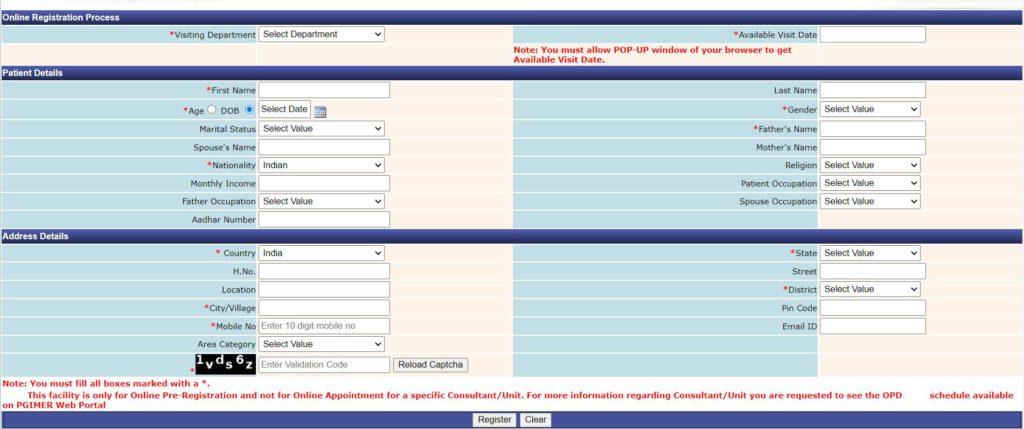
- Select/Enter the Visiting Department, Available Date.
- Under the Patient Details, Enter/Select the First Name, Last Name, Age, Date of Birth, Gender, Marital Status, Father's Name, Spouse's Name, Mother's Name, Nationality, Religion, Monthly Income, Patient Occupation, Father Occupation, Spouse Occupation, and Aadhaar Number.
- Under the Address Details, Enter the Country, State, House Number, Street, Location, District, City / Village, Pin Code, Mobile Number, Email ID, and Area Code.
- Enter the Captcha Code.
- Click on the Register Button.
- It then completes the Online Registration Process and generates the application ID used for future references.
Please Visit Our Article : Punjab Labour Card
Book PGI Chandigarh OPD Appointment (Consultation / Registration) Online@pgimer.edu.in
Let us see the online procedure to book Chandigarh OPD Appointment Online for doctor consultation online.
- Visit the Official Portal of PGI Chandigarh.
- It takes the online user to the Home Page Below.

- Click on the New/Old Pre-Registration available on the web portal.

- It then redirects the online user to the following page below.
- Select Yes/No for Do You have Central Registration No of PGIMER.
- Enter the CR Number generated at the time of user registration.
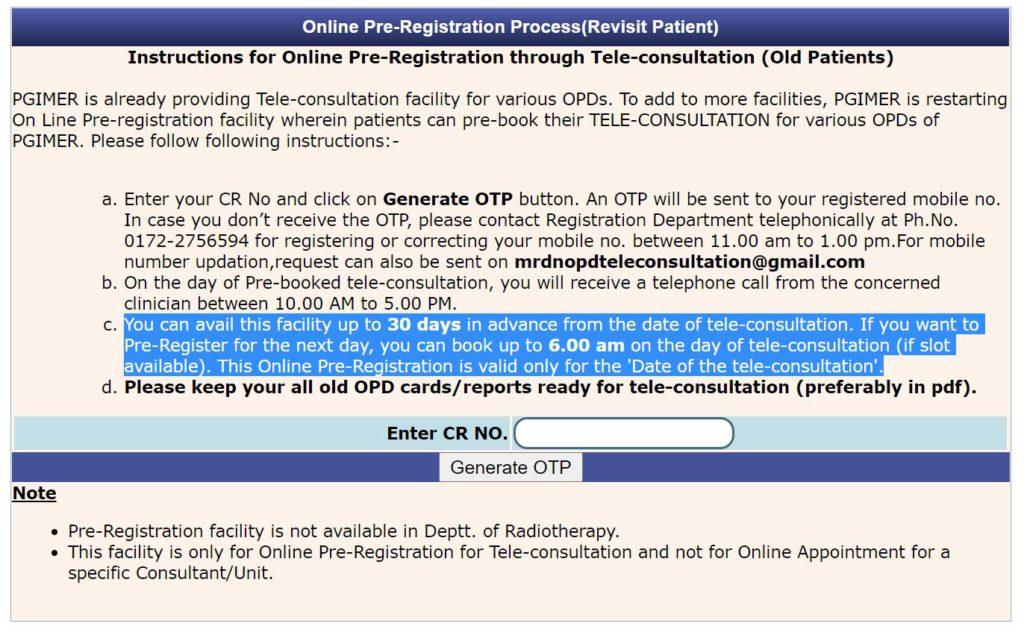
- Click on the Generate OTP button.
- It then generates the OTP to the Registered Mobile Number.
- Enter the OTP in the respective field.
- After entering the OTP, continue the rest of the process by giving the necessary details.
- On the day of Pre-booked tele-consultation, you will receive a telephone call from the concerned clinician between 10.00 AM to 5.00 PM.
- The patients can avail of this facility up to 30 days in advance from the date of tele-consultation.
- If the applicants want to Pre-Register for the next day, they can book up to 6.00 AM on the day of tele-consultation (if slot available).
- This Online Pre-Registration is valid only for the 'Date of the tele-consultation.'
Please Visit Our Article : HSSC One Time Registration Portal
Quick Links
PGI Chandigarh Online OPD Appointment FAQ's
What is the objective of the PGI Online OPD Appointment Portal of PGI Chandigarh Hospital?
What is the full form of PGIMER with relevance to this article?
Is the OPD Appointment Service available for both the new and old patients?
What is the mandatory thing to book for the online appointment for the OPD Appointment for CGI Hospital?
https://www.hindiyojana.in/pgi-chandigarh-online-opd-appointment/
Comments
Post a Comment