Complete Details about CUB Net Banking, City Union Bank Online Banking Registration, Login, PIN and User ID @onlinecub.net
City Union Bank is one of the leading private sector banks in the country. It is known for its various banking services for its customers. Moreover, the bank is also known for its growing bank structure, work culture, competitive services etc. Like other banks, Central Union Bank is also offering the Net Banking services to its customers. Through this service, the account holders can log in on the Internet Banking and avail of the Central Union Bank's various services.
Please Visit Our Article : (TMM) Tata Mumbai Marathon 2021
The interested candidates can visit and register for the Personal Banking Services of City Union Bank online.
CUB Net Banking
This article explains the online procedure to apply for the City Online Banking Registration, Login Procedure, PIN, and User ID on the official portal.
How to Register for City Union Bank Personal Banking @ cityunionbank.com
Let us see the online process to register / apply for the personal banking services of City Union Bank.
- Visit the Official Portal of City Union Bank.
- It takes the online user to the Home Page Below.

- Click on the 3 Horizontal Lines on the left side of the web page.
- It then expands into different options such as ATMs/Branches, CUB Care, Downloads, Offers, and Ways to Bank.

- Click on the Downloads option out of those given options.
- It then redirects the online following page below. Click on the Application and Forms on the same page.
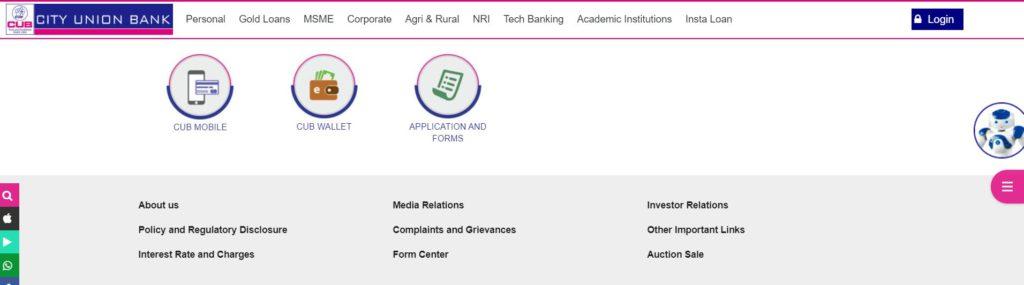
- It then takes the online user to the Application Forms Section.
- Select the Net Banking Application Option and Click on it.
- It then redirects the applicant candidate to the page below, where he/she can find the Net Banking Application Form in PDF Format.
Please Visit Our Article : Sandes Mobile App
CUB Online Net Banking Registration Form
- The online users should take a print out of the form and start filling the form manually.

- Enter the Date, Customer ID, Name of the Applicant, and Enter S/O, W/O, D/O.
- Enter the Address Details and New Address Details in the form.
- Enter the Email and Date of Birth of the Applicant.
- Under the Mobile/SMS Banking Services, Enter the Mobile Number.
- Tick on the checkboxes, as shown on the below page.
- Tick on the Check Box; I do not remember the MPIN kindly resend the same for Mobile Banking Application or SMS Banking Pull Services.
- Under the Net Banking Section, Tick on the Checkbox: I wish to apply for City Union Bank Internet Banking facility with fund Transfer or Without Fund Transfer.
- I have a Net Banking for the above Customer ID but do not remember the following. Kindly resend me the same.
- Please tick on the checkboxes: Login ID, Login Password, and Transaction Password.
- Tick on the Checkbox: I have an Internet Banking User ID. Please extend the transaction facility for the customer as mentioned above ID.
- Enter the Date and Signature at the bottom of the form.
- Attach the required documents with the application form and submit to the concerned Central Union Bank.
- The bank officials will then send you the required credentials for Net Banking through Post to the applicant's address.
- The applicant should enter the given credentials and activate the CUB Personal Banking Services.
Procedure to Login CUB Online/Personal Banking
Let us see the online process to avail of the Internet Banking Services of City Union Bank by getting logged in to the personal banking page.
- Visit the Official Portal of CUB Online Banking Services
- It takes the online user to the Home Page Below.

- Click on the Perosnal Banking tab on the same page.
- It then redirects the online user to the below-given Login page.
Login with User ID & PIN on CUB Internet Banking
Let us look at the procedure to Login using the User ID and PIN on the CUB Internet Banking. This Process is for the online users who activated their CUB Internet Banking Services.
- Enter the User ID and Password.
- Click on the Checkbox: Please Confirm your Welcome Message & Secure Access Image.

- It then takes the applicants to the personal banking dashboard.
Please Visit Our Article : Edudel Delhi Nursery Admission 2021
Quick Links
City Union Bank Official Portal
Comments
Post a Comment