Step by Step Guide to Apply Online for Thulasi PSC Kerala @ thulasi.psc.kerala.gov.in
The State Government of Kerala has launched a scheme Thulasi PSC Kerala Portal for the unemployed. The KPSC initiation aims to help the unemployed youth who are searching for online jobs. The candidates will receive alerts about various jobs once after the registration on the portal. The applicants can directly have access to the website for the process of job search.
Visit Our Latest Portal : Kite Victers Online Class Time Table November 2021
The interested applicants can visit the official portal and register for the online job search programme on thulasi.psc.kerala.gov.in.
PSC Thulasi Kerala Registration
This article explains the Thulasi PSC Kerala initiation, Apply, Login & Register, Chane OTR Details, Edit Signature and Photograph on the official portal.
thulasi.psc.kerala.gov.in Portal - Steps to Create Profile
Let us see the online procedure to create on the Kerala Online Job Search Portal. This process is for the candidates who want to register themselves on the portal.
- Visit the Official Portal of Kerala Thulasi Portal.
- It takes the online user to the Home Page.

- Click on the Signup button under the Login Page.
- It then redirects to the below registration page.

- Enter the Name, Date of Birth, Gender, Father's Name, Mother's Name, Religion, Caste, Sub Caste, Reservation Group (as per current norms), ID Proof, ID Proof Details, Aadhaar Number and Mobile Number.
- In the User ID a Password Section, Enter User ID without Spaces, Confirm User ID, Password and Confirm Password.
- Enter the Access Code, and click on the Declaration Check Box.
- Verify all the details and click on the Register Button.
- It then finishes the registration process of the user.
Kerala KPSC Thulasi Login
- Go to the Home Page to Login on the portal.
- Enter the User ID and Password.

- Click on the Login Button.
- It then opens up the User Dashboard, as shown below.
- In the personal details section, Enter Name, Date of Birth, Gender, Religion, Caste, Sub Caste, Reservation Group, Father's Name, Mother's Name, Identification Mark and Nationality.

- Click on the Save and Proceed button.
- In the Communication Details Section, Enter the House Name/Number, Street/Place, Post Office, State, District, Taluk, Local Body, and Village.
Visit Our Article : Kerala Local Body Elections 2021

- Tick if your permanent address is the same as the current address.
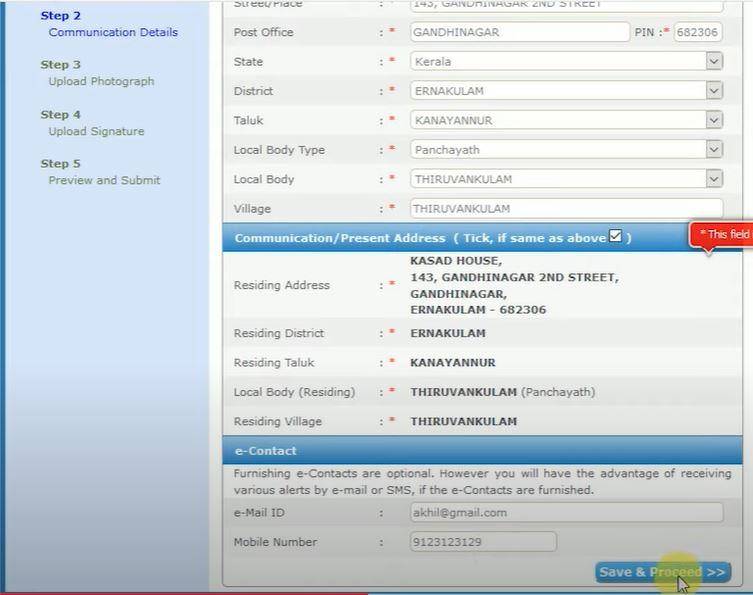
- Click on the Save and Proceed button.
- In the upload photograph section, upload the photograph of the applicant.

- Click on all the declaration checkboxes and click on the Save and Proceed button.
- Click on the Ok button on the dialogue box.
- In the upload signature section, upload the digital signature and click on save and proceed button.

- Click on Ok on the dialogue box.
- It then displays the preview of the application, and click on the submit button.
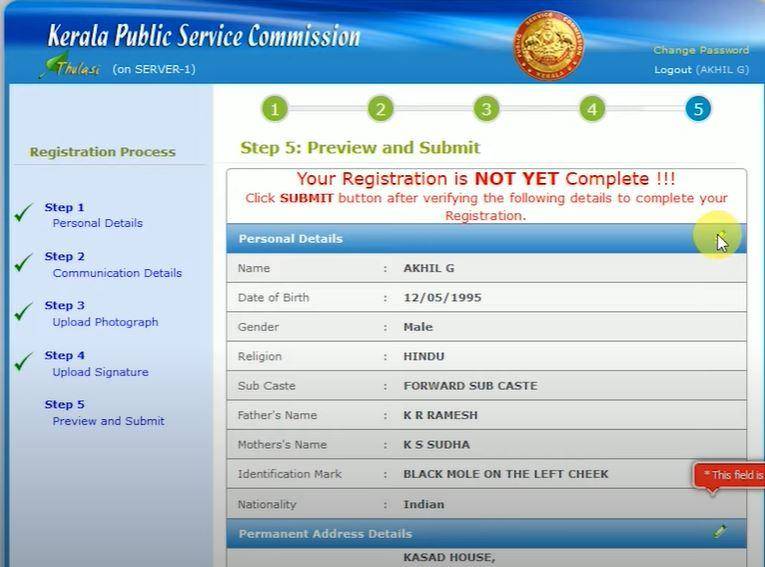
- The candidate can print the applciation form for future reference.
Changing Kerala OTR Profile Details
Let us see the online procedure to change the OTR Profile on the official website of the state.
- Visit the Official Portal of Kerala Thulasi Portal.
- It takes the online user to the Home Page.
- Enter your User ID and Password on the Login Page.
- Enter your OTR Profile after Login.
- Then choose your Educational Qualification Option.

- The applicants can edit the details of their choice.
- Click on the save option after editing your details.
How to Edit Signature and Photo on thulasi.psc.kerala.gov.in portal
Let us see the procedure to edit the signature and the photo on the official portal of thulasi kerala psc.
- Visit the Official Portal of Kerala Thulasi Portal.
- Enter your User ID and Password on the Login Page.
- It then redirects the online user to the dashboard.
- Now, the applicants can click on the add/change photograph and signature to edit.
- The applicants can edit either the photograph and signature of their choice.
Visit Our Latest Article : Google Task Mate App Referral Code
Comments
Post a Comment